Designing Embroidery Products
You can now choose the thread color(s) you’d like to use for your embroidered logo or design.
How to Choose Your Thread Colors
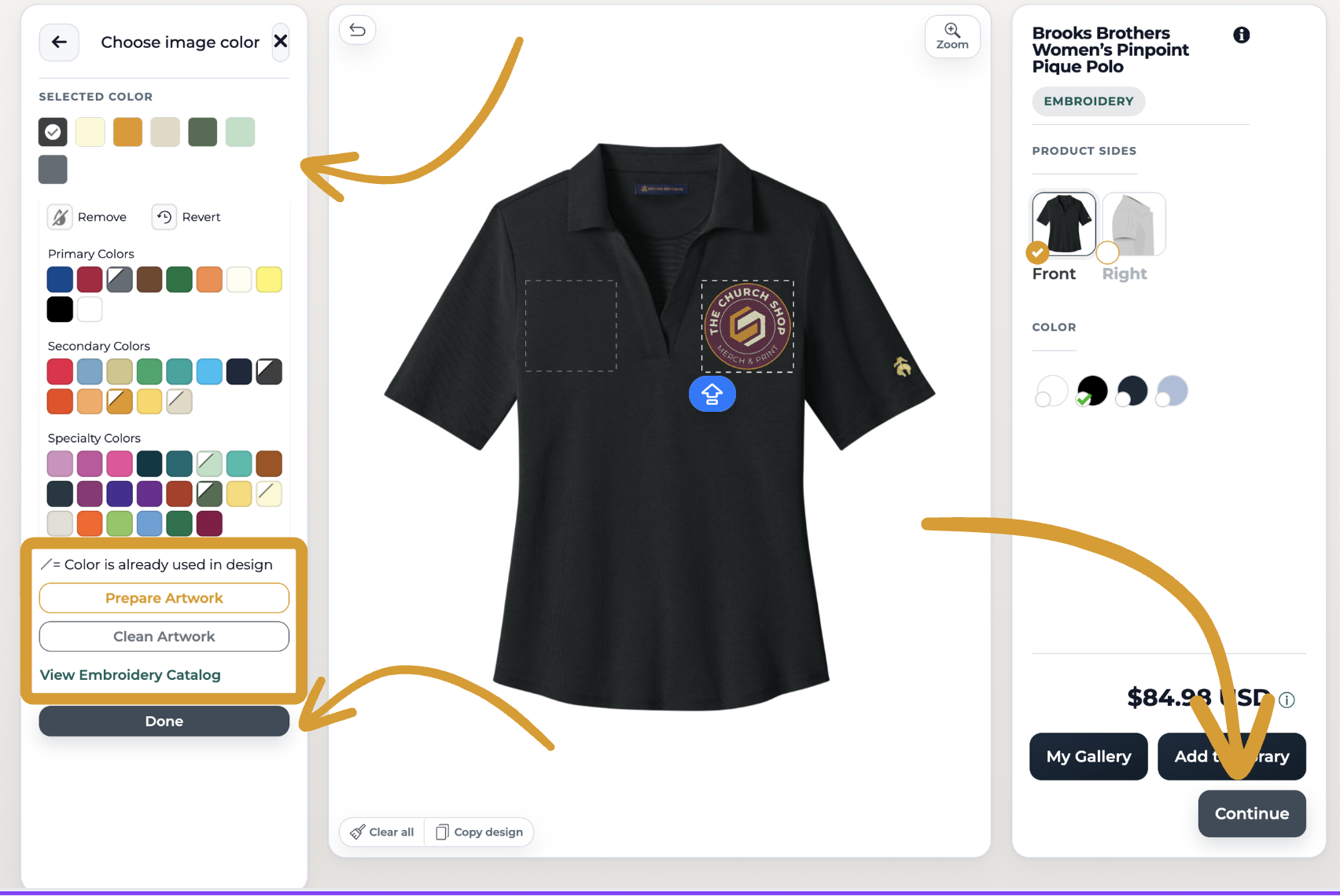
Upload your design.
Click on the color in your logo/design that you’d like to match.
Select the thread color that most closely matches your design color.
Click Done to save your selection.
Repeat the process for additional colors or other sides of the product, or click Continue to save your product.
Helpful Designer Tool Features
Inside the Designer Tool, you can also:
Click View Thread Catalog to see all available embroidery thread colors and compare them closely to your logo or artwork.
Toggle between Standard and Stitched view to preview how your design may look once embroidered.
Standard shows the regular artwork preview.
Stitched gives you a mockup-style embroidery preview so you can better visualize the final stitched appearance.
Thread Color Chart
We recommend reviewing the chart carefully to choose the closest available match for your artwork.
We currently offer a standard selection of embroidery thread colors available in our thread chart. If the exact color you need is not available, custom thread colors may still be possible upon request.
Still Have Questions?
📩 Reach out anytime at support@thechurch.shop.